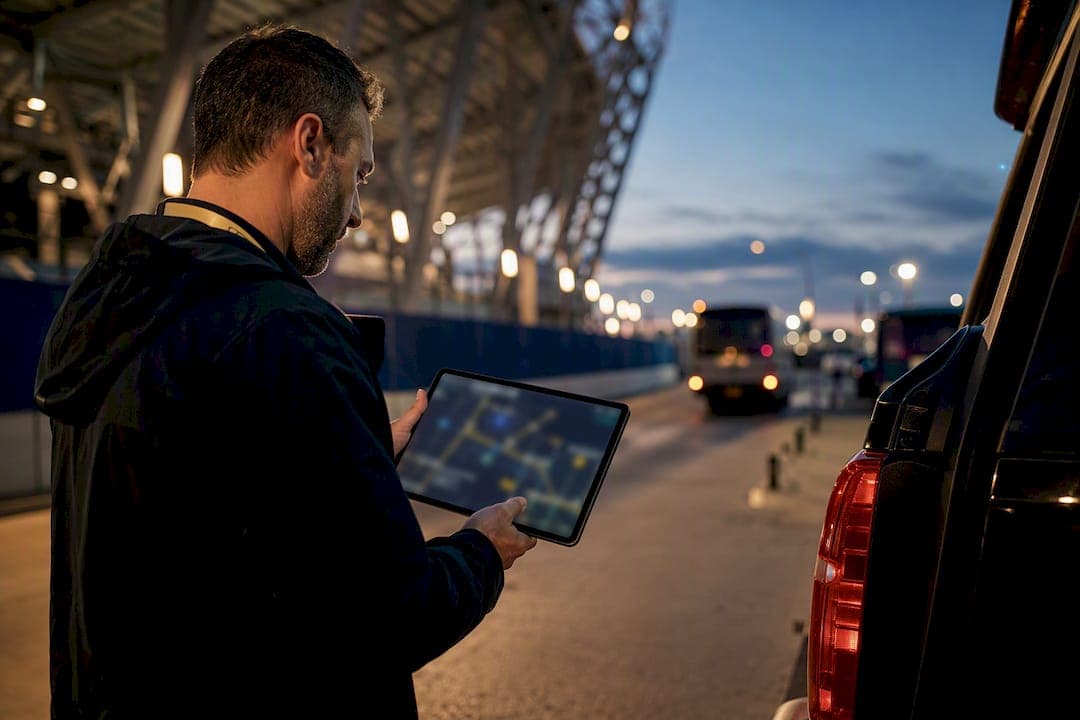
Reliably tracking private shuttle buses for talent and crew comes down to three things: real-time GPS tied to actual route context, a freshness indicator that stays under 60 seconds, and a short pilot on your worst routes before you sign anything. Skip the pilot and you're buying based on a vendor demo, not your actual coverage gaps.
TL;DR:
- A reliable shuttle tracking system must provide GPS updates under 60 seconds with at least 95% coverage during active service time.
- Testing should focus on difficult routes with poor cell service over two to three weeks to accurately assess system performance and offline behavior.
- Using dedicated hardware is more reliable for high-value routes, but phone apps work well for small fleets, provided their reliability is thoroughly tested beforehand.
- Privacy concerns can be managed by role-based access, non-public links, and clear encryption policies, especially for VIP and talent shuttles.
- Proper daily review of route performance and exception management improves accuracy and reduces dispatch calls, making a short pilot essential before full deployment.
Table of Contents
- How live shuttle tracking actually works: five layers to check
- What KPIs should you require before signing a contract?
- Should you use a phone app or dedicated hardware?
- How do you run a shuttle tracking pilot before committing?
- How do you protect privacy for VIP and talent shuttles?
- What we've learned running tracking across production shuttles
- Ready to pilot managed shuttle tracking with Riga Global Travel?
- Sources
How live shuttle tracking actually works: five layers to check
Every vendor pitch collapses into the same five layers, and each one is a place where a system can quietly fail without anyone noticing until a call center lights up.
The device layer is your first fork in the road: driver smartphone app, dedicated hardware bolted to the vehicle, or a hybrid of both. Phones deploy fast and cost almost nothing per vehicle. Hardware survives a dropped phone or a driver who forgets to open the app, but it costs more to install and maintain.
The network layer decides what happens in a dead zone. A well-built system buffers location pings locally and uploads them the moment signal returns, rather than just showing a frozen dot. The pipeline layer is the plumbing between the vehicle and your dispatch screen, and anything above 10 to 20 seconds of end-to-end latency starts to feel laggy to a coordinator staring at a screen during a load-in.
The interpretation layer turns raw coordinates into something useful through map matching, stop-aware ETAs, and filtering out impossible GPS jumps (a bus doesn't teleport three miles in four seconds, but bad data sometimes says it did). The trust layer ties it together with a visible freshness indicator and honest labeling when data goes stale instead of quietly showing an outdated position as current.
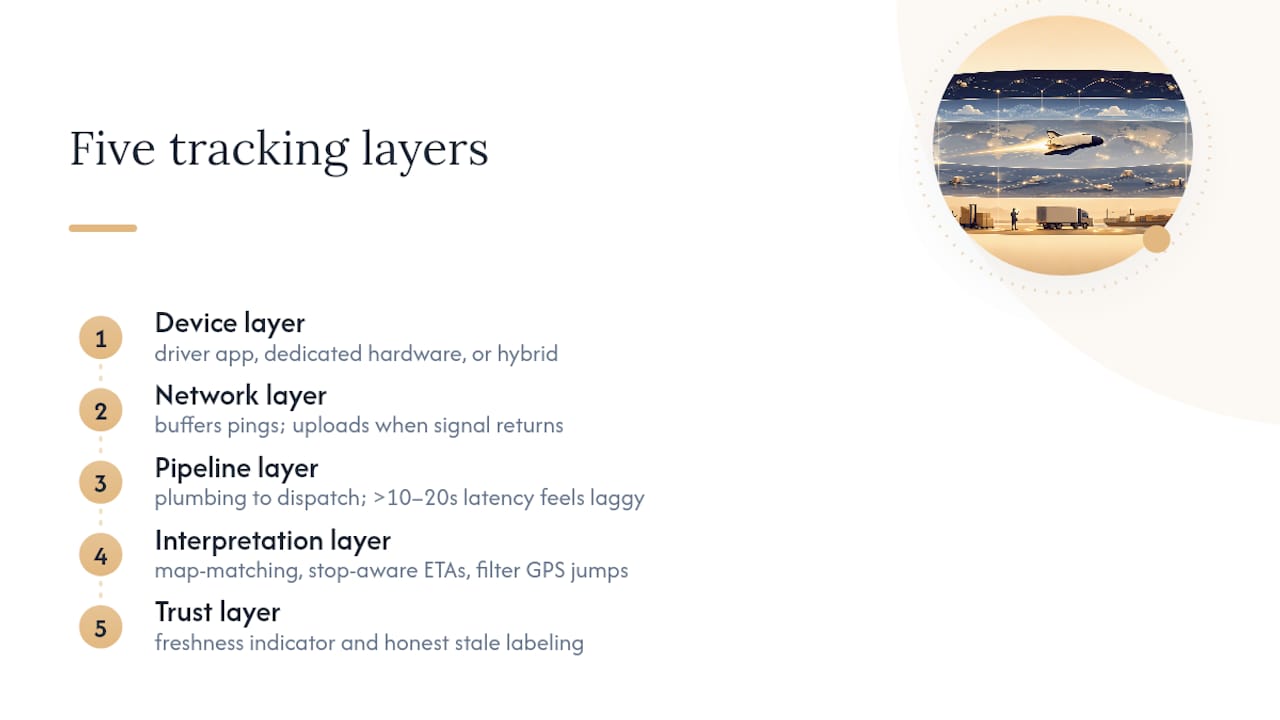
A live bus tracking system that gets these five layers right is what separates a genuinely useful dashboard from a pretty map nobody trusts after week one. Shuttle-specific platforms should also surface route history, stop activity, and geofence events, but start with route-based exceptions so dispatch isn't drowning in noise.
What KPIs should you require before signing a contract?
Set the numbers before the vendor call, not after. Vague promises about "real-time" tracking mean nothing until you attach a testable threshold to them.
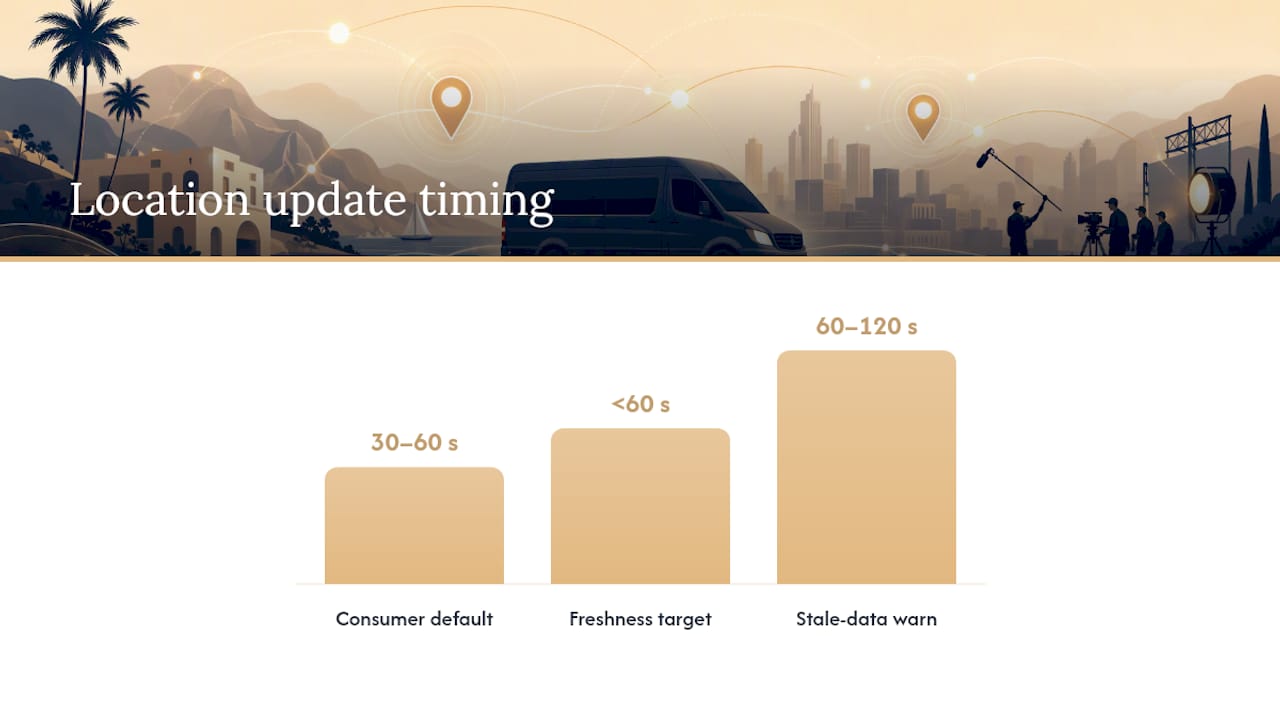
- Freshness rate. Define the percentage of active service time where the last location update is under 60 seconds old, and require at least 95% coverage. Standard 30 to 60 second refresh intervals that many consumer GPS tools default to are often too slow for tight turnarounds between set calls or press events.
- ETA quality. Require stop-aware ETAs, not straight-line distance math, and ask how you can audit accuracy at a handful of sample stops during a trial run.
- Offline and stale-data behavior. The system should buffer and upload automatically, and flag any location older than 60 to 120 seconds with a visible warning rather than letting it sit unmarked.
- Driver app reliability. Insist on testing the app in the background on the exact phone models your drivers carry, not a vendor's demo unit.
- Dispatch alerts. Automatic flags for late starts, long dwell at a stop, stale GPS, or a driver going off-route without you having to notice manually.
Pro Tip: Vendor demos almost always run on ideal hardware and full signal. Ask to test the driver app on your own drivers' phones for a week before you commit. Background power management on some Android and iOS builds silently kills location updates unless the app is configured correctly, and only real-world testing exposes that.
Dynamic dispatch and AI-assisted ETA tools add polish, but the core requirement stays the same: location data has to connect cleanly to route context, or the ETA on screen is a guess dressed up as a fact.
Should you use a phone app or dedicated hardware?
The right answer depends on fleet size, route criticality, and how much tolerance you have for a driver forgetting to charge a phone before a 5 AM call time.
- Phone apps deploy in a day, cost little beyond a driver stipend, and work well when policy enforces on-duty-only tracking with clear driver consent and a defined retention period. The tradeoff is dependence on the driver's own device, battery, and OS settings.
- Dedicated hardware survives phone swaps, low battery, and app-closing habits, and it resists tampering on vehicles where that matters. It costs more upfront and needs an install and maintenance schedule.
- Hybrid setups pair a phone app with a Bluetooth beacon or a backup hardware tracker on your highest-value VIP routes, so a single point of failure doesn't leave you blind during an awards show transfer.
- Network resilience should be a written requirement, not an assumption. Ask for buffering, retry logic, and documented offline behavior spelled out in the service agreement, not just described verbally on a sales call.
Fleet size changes the math too: a five-van unit for a local shoot can lean on phones alone, while a fifty-vehicle operation across multiple venues benefits from hardware redundancy on the routes carrying talent or executives.
How do you run a shuttle tracking pilot before committing?
Run the pilot on your worst routes, not your easiest ones. A vendor that performs well in a dead zone near a stadium loading dock will perform well everywhere else too.
- Pick the hardest routes. Choose the ones with the worst cellular coverage, the highest call volume, and the highest-value passengers, whether that's a headline talent shuttle or a crowded broadcast crew run.
- Run it for two to three weeks. Long enough to catch a bad-weather day, a schedule change, and a genuine dead zone, but short enough to make a decision before your next production cycle starts.
- Track four numbers. Freshness coverage, ETA accuracy at sampled stops, inbound "where is the shuttle" call volume before and after, and driver app compliance.
- Replay incidents. When something goes wrong, pull the route history and see whether the system caught it or you found out from an angry text message.
| Metric | Pilot target |
|---|---|
| Freshness coverage | high percentage of active time under 60 seconds |
| ETA accuracy | Within a few minutes at sampled stops |
| Call volume change | Meaningful drop from baseline |
| Driver app compliance | Consistent status updates across all shifts |
Operations that roll this out properly often see "where is the bus?" calls drop by half or more once freshness and stop alerts are actually working. If your pilot doesn't clear your thresholds, that's your answer. If it does, roll out with a short driver onboarding session and a passenger communication plan so nobody's confused by a new link showing up in their texts.
How do you protect privacy for VIP and talent shuttles?
Visibility and privacy aren't opposites here, but they do require deliberate design, not a default "everyone sees everything" dashboard.
- Build role-based visibility so dispatch sees full detail, an assistant sees a simplified ETA, and security sees exactly what they need, nothing more.
- Use non-public tracking links rather than a shareable map anyone with the URL can open indefinitely.
- Track drivers only while on duty, with clear consent and a stated retention policy for how long location history is kept.
- Ask vendors directly about encryption in transit and at rest, who can access logs, whether screenshots or forwarding can be restricted, and whether sharing links can expire.
Executive and VIP transport visibility works best when it's discreet by default and opened up selectively, not the other way around.
Pro Tip: If a vendor can't answer "who exactly can see this link and for how long" in one sentence, that's a real gap, not a minor detail to sort out later.
What we've learned running tracking across production shuttles
Vehicle location only means something when it's tied to trip context, whether that's an airport transfer timed against a flight board, a hotel-to-venue staging run before a red carpet call, or a media crew shuttle looping between a stadium and a broadcast compound. A GPS dot with no context is just a dot.
Daily exception review catches more problems than any dashboard alert ever will, because a human glancing at yesterday's dwell times spots patterns a rule engine misses. Weekly stop tuning matters just as much: a pickup point that consistently runs five minutes long is worth fixing before it becomes a pattern across an entire shoot schedule. Driver onboarding on the tracking app deserves the same attention as onboarding on the actual vehicle.
The numbers worth watching are on-time staging, stop-level dwell, exception frequency, and the drop in dispatch calls once a pilot is running well. If you want to see what that looks like on your own routes, a pilot conversation is the fastest way to find out.
— Sammy
Ready to pilot managed shuttle tracking with Riga Global Travel?
A managed shuttle tracking service is the practical next step after you've read through freshness targets and pilot design and realized building this in-house means chasing five different vendors for five different layers. A managed two to three week pilot can be run on your hardest routes, with chauffeured vehicles paired with integrated tracking, dispatch, and exception management already built in, so you get the measurement and the rollout recommendation without assembling it piece by piece yourself.
That means one team handling the vehicles, the drivers, and the visibility layer together, instead of a tracking app bolted onto a transport vendor with no accountability for a stale GPS ping during a live broadcast call time. If you're staging talent transportation for an event, coordinating corporate travel, or planning shuttle logistics for a Los Angeles production, reach out and request a pilot conversation. Tell us your hardest route, and we'll tell you what your freshness and call volume numbers should look like before we ever put a vehicle on it.
Sources
For deeper technical grounding, review the live bus tracking buyer's guide on freshness KPIs, the shuttle fleet GPS feature breakdown, and the limo fleet tracking guide on phone-based driver apps. The Streamline Productions case study shows what independent client visibility looks like in an active production environment.
- Live bus tracking system: 2026 buyers guide to reliable ETAs — RouteBot
- GPS tracking for shuttle and bus fleets — TrackHawk
- Bus fleet management software — Endera
- The complete guide to limo fleet tracking in 2026 — DrivOQ