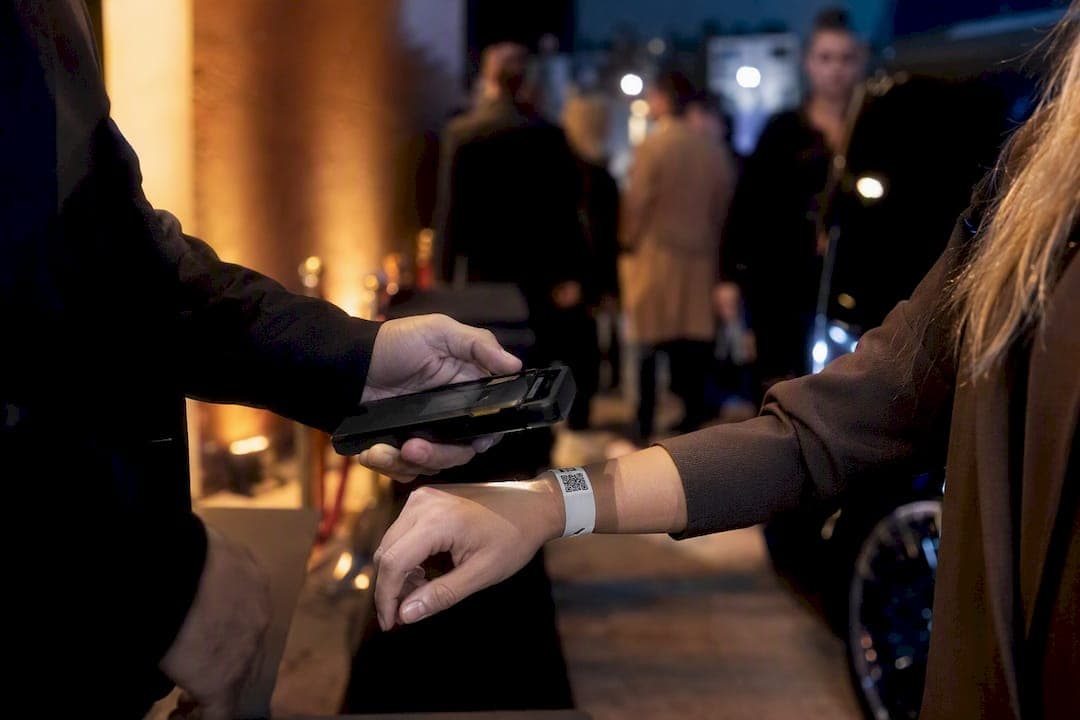
For most live events, the right starting point is one of three lanes: modular accreditation hubs for large or high-security shows, all-in-one pass managers for mid-size festivals and conferences, and staff-focused validation tools for crew-heavy productions. Which lane you pick depends less on budget than on how many access zones you're managing and how fast you need to revoke a credential when someone walks off a job mid-event.
Here's the quick shortlist, with the operational reason each one earns a spot:
- Accredit — best when you're running a stadium, arena, or anything with government or high-security requirements and need real-time dashboards across every gate.
- Lennd — best for festivals and mid-size productions that need group request portals and on-site badge printing without juggling three separate tools.
- EventSuite — best when your priority is linking accreditation status directly to gate validation for crew and contractors.
- EventCredentials — best when anti-counterfeit photo credentials and bundled hardware matter more than software flexibility.
- WRSTBND — best for ticketed events and festivals that want flexible badge formats tied to validation.
Pro Tip: If your event has more than three access zones or any broadcast/production element, demo the modular accreditation platform first. Everything else can be evaluated against that baseline.
Key Takeaways
Event credentialing software works best when accreditation and issuance run as one connected system, tied to live gate validation instead of a static list.
| Point | Details |
|---|---|
| Match platform to scale | Use modular hubs like Accredit for high-security events, all-in-one managers like Lennd for mid-size shows. |
| Prioritize live revocation | A credential should stop working at every gate within minutes of being pulled, not by the next shift. |
| Pre-issue digital passes | Reserve on-site printing for VIPs and late arrivals to avoid gate-line bottlenecks. |
| Test integration before event day | Confirm the platform actually talks to your access control and scheduling systems, not just on paper. |
| Coordinate transport with credentialing | Rigaglobaltravel aligns chauffeured transport and vehicle credentials with your event's access plan for smoother crew and talent movement. |
Table of Contents
- What Is Event Credentialing Software and Who Needs It?
- How Do the Top Credentialing Platforms Compare?
- How Do You Choose Credentialing Software for Your Event?
- How Does the Credentialing Workflow Actually Run?
- What Hardware Do You Actually Need On-Site?
- What Mistakes Should You Avoid During Implementation?
- Sources
What Is Event Credentialing Software and Who Needs It?
Event credentialing software manages the full lifecycle of personnel access: collecting applicant data, vetting and approving requests, issuing physical or digital credentials, and validating them at entry points in real time. It's a distinct category from general event registration software, which handles public ticket sales and attendee sign-ups. Credentialing tools exist to control who can go where, not who bought a ticket.
That distinction matters operationally. A centralized system built for credential management gives you real-time tracking, QR or biometric validation, and automated approval chains, so a credential that gets pulled at 2 p.m. stops working at every gate by 2:01, not by the next shift change. If you're coordinating staff, vendors, crew, and contractors across a multi-zone venue, this is the software layer that keeps a security breach from becoming a headline.
How Do the Top Credentialing Platforms Compare?
| Product | Best for | Pricing model | Hardware support | Integrations |
|---|---|---|---|---|
| Accredit | Large stadiums, government/high-security events | Subscription, enterprise licensing | RFID, QR, mobile, biometric | Access control systems, ticketing |
| Lennd | Festivals, multi-stage, mid-size productions | Per-event or subscription | QR, on-site badge printers | Ticketing, group request portals |
| EventSuite | Crew-heavy events needing gate validation | Subscription | QR, mobile scanning | Access control, HR/scheduling |
| EventCredentials | Anti-counterfeit photo credential needs | Turnkey, hardware-included | RFID, photo credential printers | Registration systems |
| WRSTBND | Ticketed events, flexible pass models | Per-event | QR, RFID, wristbands | Ticketing platforms |
Accredit is built for the kind of event where a mistake at the gate makes the news: modular workflows, role and zone based access, and dashboards that show every credential status in real time. Lennd centralizes requests and approvals through group portals, then handles on-site badge generation without a separate print system bolted on. EventSuite keeps a clean line between the approval process and gate validation, which crew-heavy shoots and broadcast events tend to prefer.
EventCredentials leans turnkey: photo credentials, RFID hardware, and issuance bundled together for teams that don't want to manage printers themselves. WRSTBND covers ticketed events and festivals with flexible badge and wristband formats.
Before you book a demo with any of them, ask three questions upfront: How fast does a revoked credential stop working at every gate? Does it integrate with the access control hardware you already own? And who handles on-site printing and staffing on event day, you or them?
How Do You Choose Credentialing Software for Your Event?
Rank vendors by operational control first, price last. A cheaper platform that can't revoke a badge in real time will cost you more in security exposure than it saves in subscription fees.
Work through these criteria in order:
- Live revocation and zone mapping — can a credential be pulled instantly, and does the system support granular, role-based zones rather than one flat "all access" tier?
- Integration fit — does it talk to your existing access control hardware, ticketing platform, and HR or scheduling tools?
- Hardware support — RFID, QR, badge printers, and scanners should match your event's throughput, not force a workaround.
- Scalability — will it hold up if attendance or crew count doubles next season?
- Data and PII handling — where is applicant data stored, and who can access it?
- Cost model — subscription versus per-event versus turnkey, and what hardware costs sit outside the base price.
- Vendor services — does the provider offer on-site staffing and implementation support, or are you on your own?
During any sales call, push for specifics: "Show me a live revocation happening at a gate reader" beats "Tell me about your security features." Watch for red flags like vague answers on audit logs, support SLAs that aren't in writing, or a platform that only "plans to" integrate with your access control hardware.
How Does the Credentialing Workflow Actually Run?
The lifecycle runs in five stages: collect, vet and approve, issue, validate, and revoke. It typically starts with custom intake forms tailored to different populations, whether that's crew, vendors, or media, then moves through multi-level approval before a credential gets issued as a digital pass or physical badge. Some platforms, like the workflows Weezevent describes, let you assign different rights per population and make bulk changes on the fly when a schedule shifts.
Core features worth checking for:
- Role-based access tied to specific zones, not just general admission
- Multi-level approval chains for sensitive credentials
- Group portals so a production company can submit one batch request
- Photo ID capture and verification
- Bulk upload for large crew or vendor lists
- Audit logs and reporting for post-event review
- On-site check-in and printing for exceptions
Example use cases:
| Event type | Credentialing flow |
|---|---|
| Music festival | Crew submits through group portal, gets zone-specific wristbands, on-site printing handles late additions |
| Stadium broadcast | Vetted crew get RFID badges tied to specific production zones, validated at fixed gate readers |
| Vendor deliveries | Driver and vehicle credentials link to a staging schedule, gate staff scan and clear on arrival |
What Hardware Do You Actually Need On-Site?
Pre-issued digital passes should be your default, not the exception. On-site printing frequently becomes the bottleneck that backs up a gate line before doors, so reserve it for VIPs, replacements, and late additions only.
Match the reader technology to your throughput. QR-based mobile validation works fine for conferences and mid-size events where scan volume stays modest, while RFID and fixed gate readers scale better for stadium and festival gates processing thousands of entries per hour.
Your hardware checklist should cover: badge printers (on-site, for exceptions), mobile scanners for roaming staff, fixed readers at high-traffic gates, and an offline fallback in case venue connectivity drops mid-event.
Pro Tip: Run a test batch of credentials through your printer and scanner setup before doors open. It's the cheapest insurance against a gate jam you'll ever buy.
What Mistakes Should You Avoid During Implementation?
The most common failure is running credentialing in a silo, disconnected from security and production systems, so a status change in one place doesn't reach the gate reader for hours. Treating accreditation and credential issuance as one linked system prevents that gap.
Run this checklist across three phases:
- Pre-event: integration test between credentialing and access control systems, sample scan-rate test at expected peak volume, confirmed data handling policy for applicant PII.
- On-site: working offline fallback for scanners, staffed exception line for on-site printing, live dashboard visible to security leads.
- Post-event: audit log review, credential deactivation for all temporary access, debrief on any gate delays or scan failures.
Publisher perspective: what we see working on professional events
Credentialing clarity saves time in places people don't expect, especially transport. When a driver's vehicle credential and staging point are locked in before call time, crew movement stops depending on a radio call to sort out who's allowed where.
Credentialed staff need transport that moves as fast as their access
Software solves who gets through the gate. It doesn't solve how your talent, crew, and vendors actually get to that gate on time, in the right vehicle, with the right driver clearance.
Rigaglobaltravel handles the piece credentialing software doesn't: chauffeured transport and on-site logistics built around the same access rules your event already runs on. Vehicle credentials, driver vetting, and staged pick-up points get coordinated directly with your production schedule, so a credentialed crew member isn't standing at a curb waiting on a car that doesn't know which gate to use. That coordination matters most for talent and VIP movement in New York, where production schedules and street access can change within the hour. If you're planning ground transport around an already-credentialed event, request a quote and get vehicle and driver logistics locked in alongside your access plan.
Sources
- Security & permissions | Eventation
- Accredit Solutions – Our platform
- Event Staff Credentialing for Crew & Contractors | EventSuite
- Credential & Pass Management for Events - Lennd
- Best on-site badge printing software (2026) | Eventdex blog